HRIS Mobile Attendance App – Employee Check-in & Check-out System
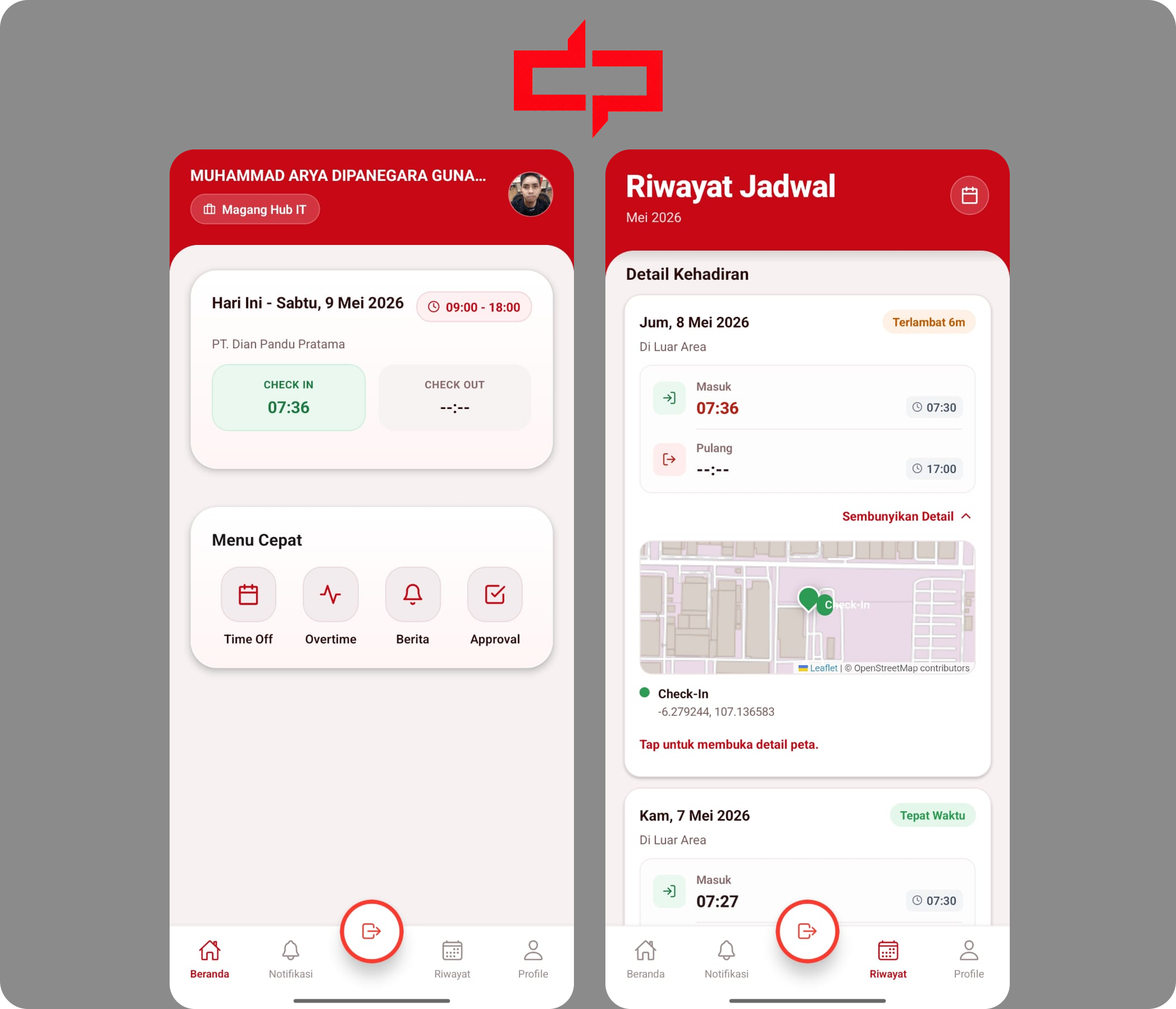
HRIS Mobile Attendance App is a mobile application designed to help employees manage attendance activities such as check-in, check-out, attendance history, leave information, overtime requests, work schedules, and profile data through a clean and accessible mobile experience.
Tech Stack
Goal
Solve a concrete workflow problem with a maintainable web system.
Status
Featured published project
Reading
5 min read
HRIS Mobile Attendance App – Employee Check-in & Check-out System
HRIS Mobile Attendance App is a mobile application developed to help employees manage their daily attendance activities more easily through their mobile devices.
The application is designed to support attendance processes such as check-in, check-out, attendance history, leave information, overtime requests, work schedule, profile data, and attendance validation.
This project was created to improve the employee attendance experience by providing a more practical, modern, and accessible mobile solution that connects with the existing HRIS and Odoo-based company system.
Background
In a company with many employees and different work schedules, attendance management needs to be accurate, fast, and easy to access.
When employees rely only on manual attendance processes or systems that are not optimized for mobile usage, several issues can occur, such as difficulty checking attendance records, limited access to work schedules, unclear leave information, and less efficient attendance submission.
The HRIS Mobile Attendance App was developed to make the attendance process more convenient for employees while still keeping the data connected to the company’s HR system.
Main Features
Employee Authentication
The application provides a secure login flow for employees to access their HRIS account.
After logging in, users can access their profile, attendance data, work schedule, and other HR-related information based on their employee data from the backend system.

Check-in & Check-out
The main feature of this application is employee attendance submission.
Employees can perform check-in and check-out directly from the mobile app. The system is designed to follow attendance rules, including preventing duplicate attendance when a previous attendance session has not been completed.
This helps ensure that attendance records are more accurate and consistent with the company’s attendance policy.

Attendance History
Employees can view their attendance history directly from the application.
This feature helps users review their past check-in and check-out records, making it easier to track daily attendance activity without needing to ask the HR team manually.

Work Schedule
The application displays employee work schedules based on the user’s profile and shift data.
This allows employees to see their assigned working hours and understand when they need to check in or check out, especially when different employees have different shift patterns.
Leave Information
The app provides access to leave-related information, including leave history and remaining leave balance.
This feature helps employees monitor their leave usage and understand their available leave quota more clearly.
Overtime Request
Employees can submit and view overtime requests through the mobile application.
This makes the overtime process more accessible and helps reduce manual communication between employees and the HR team.

Profile & Employee Data
The application includes a profile section where employees can view their personal and employment-related information.
This helps employees access important HR data from one place without needing to open a desktop-based system.

Attendance Validation
The system is also prepared to support attendance validation, including pre-attendance checks and photo-based validation.
This feature helps improve attendance reliability by ensuring that attendance submissions follow the company’s validation requirements.
My Role
In this project, I was involved in developing the mobile application and integrating it with the existing backend and HRIS data flow.
My main responsibilities included:
- Building the mobile application using React Native and Expo
- Creating a clean and mobile-friendly user interface
- Implementing authentication flow for employee users
- Integrating mobile screens with backend APIs
- Developing attendance-related features such as check-in, check-out, and attendance history
- Displaying employee work schedules based on user profile data
- Integrating leave history and remaining leave information
- Supporting overtime request features
- Handling profile data and employee information
- Preparing attendance validation flow for photo or face-based verification
- Debugging mobile issues during development and testing
Tech Stack
This project was built using React Native, Expo, TypeScript, Expo Router, Axios, Node.js, Express.js, PostgreSQL, Odoo Integration, and REST API.
Result
The HRIS Mobile Attendance App became a mobile solution that helps employees access attendance and HR-related features more easily.
With this application, employees can check their work schedule, submit attendance, view attendance history, monitor leave information, and access profile data directly from their mobile devices.
This project helps improve the employee attendance experience by making the process more practical, accessible, and connected to the company’s existing HR system.
Key Takeaways
Through this project, I learned how to build a mobile application that connects with real company operations and HR data.
This project strengthened my experience in mobile development, API integration, attendance business logic, user experience design, and handling real-world requirements in an employee-facing application.
Like this project if it was useful.
Comments
Join the discussion for this project.
Join the discussion
Sign in first, then write a comment or reply to an existing thread.
Sign in with GitHub to start a new comment. After that, this area will become active for writing.
Your GitHub identity will be used for comment attribution.