JobNotes – Job Application Tracker & Recruiter Notes Platform
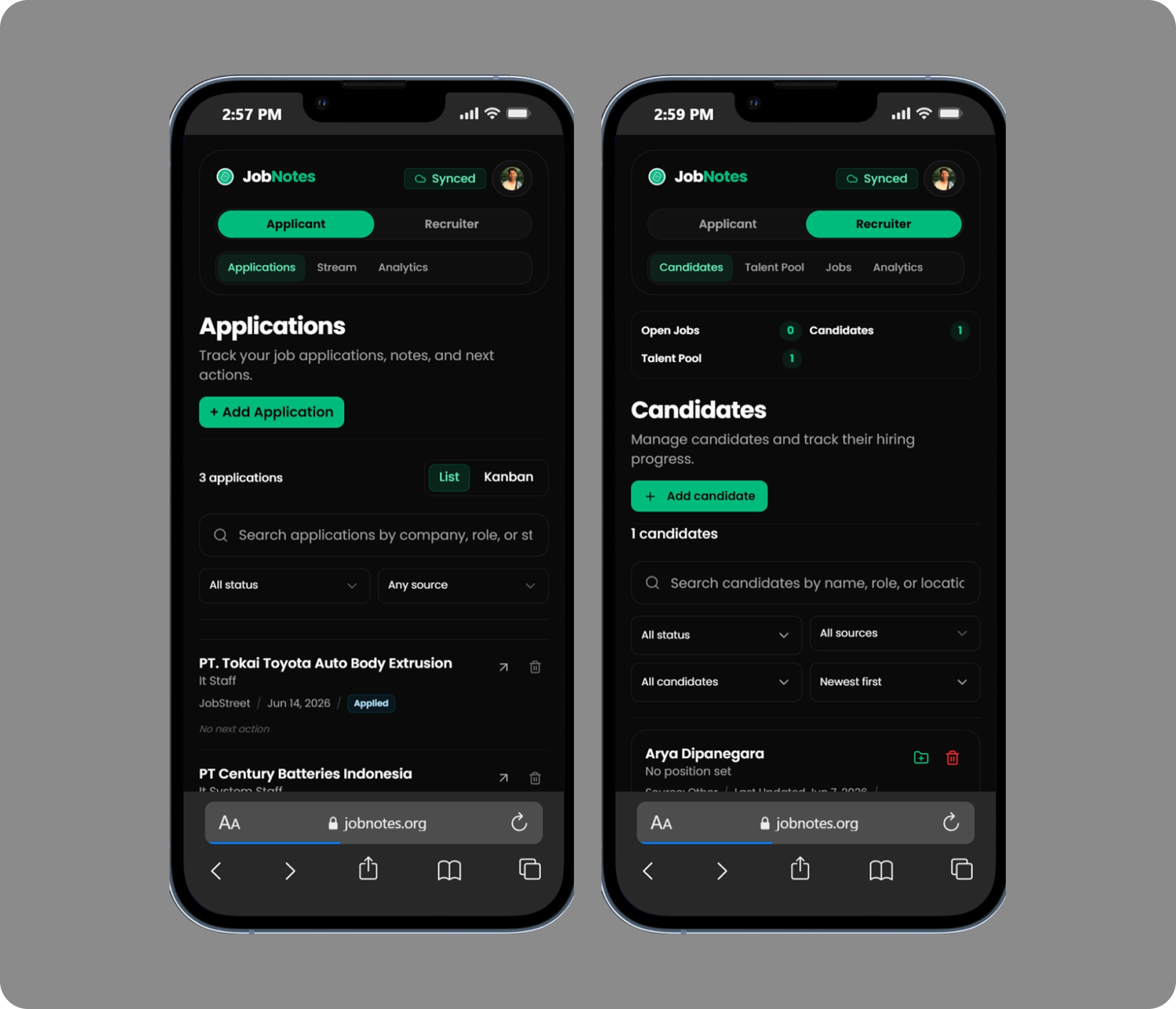
JobNotes is a web-based application created to help users manage their job application process in a more organized way.
Tech Stack
Goal
Solve a concrete workflow problem with a maintainable web system.
Status
Featured published project
Reading
6 min read
The main idea behind this project was simple: when someone applies to many jobs, it becomes easy to lose track of which company has been applied to, which recruiter has contacted them, what the current status is, and what needs to be done next.
JobNotes was built to solve that problem by providing a lightweight job application tracker that can be used quickly, even without logging in first. Users can start saving their application data locally, then login with Google when they want to save or sync their data.
This project was also created as a portfolio project to explore a more product-oriented flow, not only focusing on the technical side, but also on usability, user experience, local-first behavior, and a practical problem that many job seekers can relate to.
Background
During the job search process, many people usually save their applications in different places, such as spreadsheets, notes apps, chat messages, screenshots, or browser bookmarks.
This can become messy over time, especially when the number of applications increases. Users may forget the application status, recruiter contact, interview schedule, follow-up notes, or the next step they need to take.
JobNotes was developed to make this process cleaner and easier to track. The goal was not to build a complex recruitment system, but to create a simple tool that helps users stay organized while applying for jobs.
The application also uses a local-first approach, so users can try and use the app first without being forced to create an account at the beginning.
Main Features
Job Application Tracker
The main feature of JobNotes is the job application tracker.
Users can record job applications with important information such as company name, position, application status, source, location, work type, salary range, recruiter contact, and other related details.
This helps users keep all their job application data in one place instead of spreading it across multiple tools.
Application Status Management
JobNotes provides status management to help users track their application progress.
Each application can be organized based on its current stage, such as applied, interview, offering, rejected, or other custom statuses depending on the flow.
This makes it easier for users to understand which applications need follow-up and which ones are already finished.
Notes and Timeline
JobNotes includes notes and timeline features so users can record important updates for each job application.
Users can save interview notes, recruiter messages, follow-up history, reminders, or any important context related to the application.
The timeline helps users see the history of each application more clearly, making the process easier to review later.
Next Action
The Next Action feature helps users remember what they need to do after submitting or updating an application.
For example, users can record actions such as follow up with recruiter, prepare for interview, send portfolio, update CV, or wait for feedback.
This feature was added to make JobNotes more practical, because job hunting is not only about saving data, but also about knowing what to do next.
Local-first Usage
One of the key decisions in JobNotes is allowing users to use the application without logging in first.
The data can be stored locally in the browser, so users can try the app immediately without going through an account registration process.
This makes the first experience lighter and faster, especially for users who only want to test the app before deciding to save their data online.
Google Login and Sync
JobNotes also supports Google login for users who want to save their data to an account.
With this flow, users can start using the app locally first, then login later when they want to keep their data safer or access it from another device.
This approach was chosen to reduce friction at the beginning while still providing an account-based experience when needed.
Recruiter Notes
Besides the job seeker flow, JobNotes was also designed with a recruiter notes concept.
This feature allows recruiter-side users to record candidate information, notes, and recruitment-related details in a simpler way.
The idea is to make JobNotes flexible enough to support both job seekers and recruiters, while still keeping the product simple and focused.
Dashboard and Analytics
JobNotes includes a dashboard and summary view to help users understand their job application progress.
Users can see application counts, status distribution, and other simple insights based on the data they have entered.
This gives users a quick overview of their job search activity without needing to manually calculate everything.
My Role
In this project, I worked on the application from the frontend, backend, database, authentication, local storage, and deployment sides.
My main responsibilities included:
- Designing the product flow for job application tracking
- Building the frontend using Next.js, React, TypeScript, Tailwind CSS, and shadcn/ui
- Creating reusable UI components for forms, tables, modals, and detail pages
- Implementing local-first data storage using IndexedDB and Zustand
- Developing backend APIs using Express.js, TypeScript, Prisma, and PostgreSQL
- Implementing Google OAuth login for account-based data saving
- Creating repository logic for local and cloud data handling
- Building application notes, timeline, status, and analytics features
- Handling data synchronization flow between local data and account data
- Deploying the application using Docker, Nginx, and VPS
- Configuring production environment, domain, and backend API routing
Tech Stack
This project was built using Next.js, React, TypeScript, Tailwind CSS, shadcn/ui, Zustand, IndexedDB, Node.js, Express.js, Prisma ORM, PostgreSQL, Google OAuth, Docker, Nginx, and VPS.
The frontend uses a local-first approach with IndexedDB, while the backend provides account-based data storage and synchronization through REST APIs.
Result
JobNotes became a published personal project that demonstrates how a simple real-life problem can be turned into a practical web application.
The project shows not only frontend and backend development skills, but also product thinking, user flow design, local-first data handling, authentication, database design, and deployment.
With JobNotes, users can manage job applications more neatly, track their progress, save important notes, and decide whether they want to keep using the app locally or login with Google to save their data.
Key Takeaways
Through this project, I learned more about building a product that focuses on simplicity, usability, and real user problems.
JobNotes helped me explore local-first application behavior, data synchronization, authentication flow, and how to design a system that does not force users to login before they understand the value of the product.
This project also strengthened my experience in building a fullstack web application from idea, UI design, frontend implementation, backend API, database structure, authentication, and production deployment.
Like this project if it was useful.
Comments
Join the discussion for this project.
Join the discussion
Sign in first, then write a comment or reply to an existing thread.
Sign in with GitHub to start a new comment. After that, this area will become active for writing.
Your GitHub identity will be used for comment attribution.